 |
 |
|
Soundeasy Demonstrations
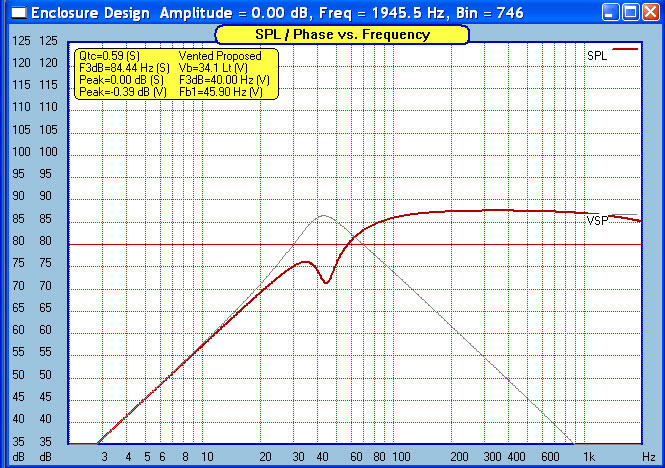
Measuring T/S Parameters In this demonstation, I walk you through the process of hooking up a driver to Soundeasy and measuring the Theil Small Parameters of the driver. T-S Online Demo Standalone Flash EXE File Setting up your Soundeasy microphone calibration file (Soundeasy cannot calibrate your microphone! You need to either use the manufactures supplied calibration file or send your microphone out to get calibrated.) In this demonstration, I walk you through the process of creating a Soundeasy microphone calibration file that you will need when you start using a microphone. Creating Mic Calibration File Online Demo Standalone Flash EXE File Measuring The Frequency Response Of A Finished Speaker With Soundeasy In this demonstration, I walk you through the process of measuring the frequency response of a finished loudspeaker using Soundeasy. I use the near and far field measurment technique. Please note my adding of near port and near driver is not accurate in this demonstration. At the time i made this demonstration i was using a cheap USB sound card that was not capturing the low end data accuratly. To merge near driver and near port data you must line up the tails of each first then add them. You will see my driver data does not include a good dip like it should at the same freqency as the port peak See this picture of theoretical near port and driver to see how the near driver and port should be aligned. See how the peak in the vent measurement is directly over the dip in the driver measurement. Also notice the tails (0Hz - 20Hz) are nice and overlapping. This is what you want to look for when you add near driver and near woofer. Now keep in mind i have never gotten measurments that look perfect like this image. So align the tails as best as you can Measuring The Frequency Response Of A Finished Speaker With Soundeasy On-Line Demo Standalone Flash EXE File Measuring The Impedance Of A Finished Speaker With Soundeasy In this demonstration, I walk you through the process of measuring the impedance of a finished loudspeaker using Soundeasy. Measuring The Impedance Of A Finished Speaker With Soundeasy On-Line Demo Standalone Flash EXE File
All designs and original content posted on these pages are Copyright © 2006 Chad Gray, All Rights Reserved. No part of this website may be reproduced in any form without written or email consent from the author. These designs are free for non-commercial use.
|